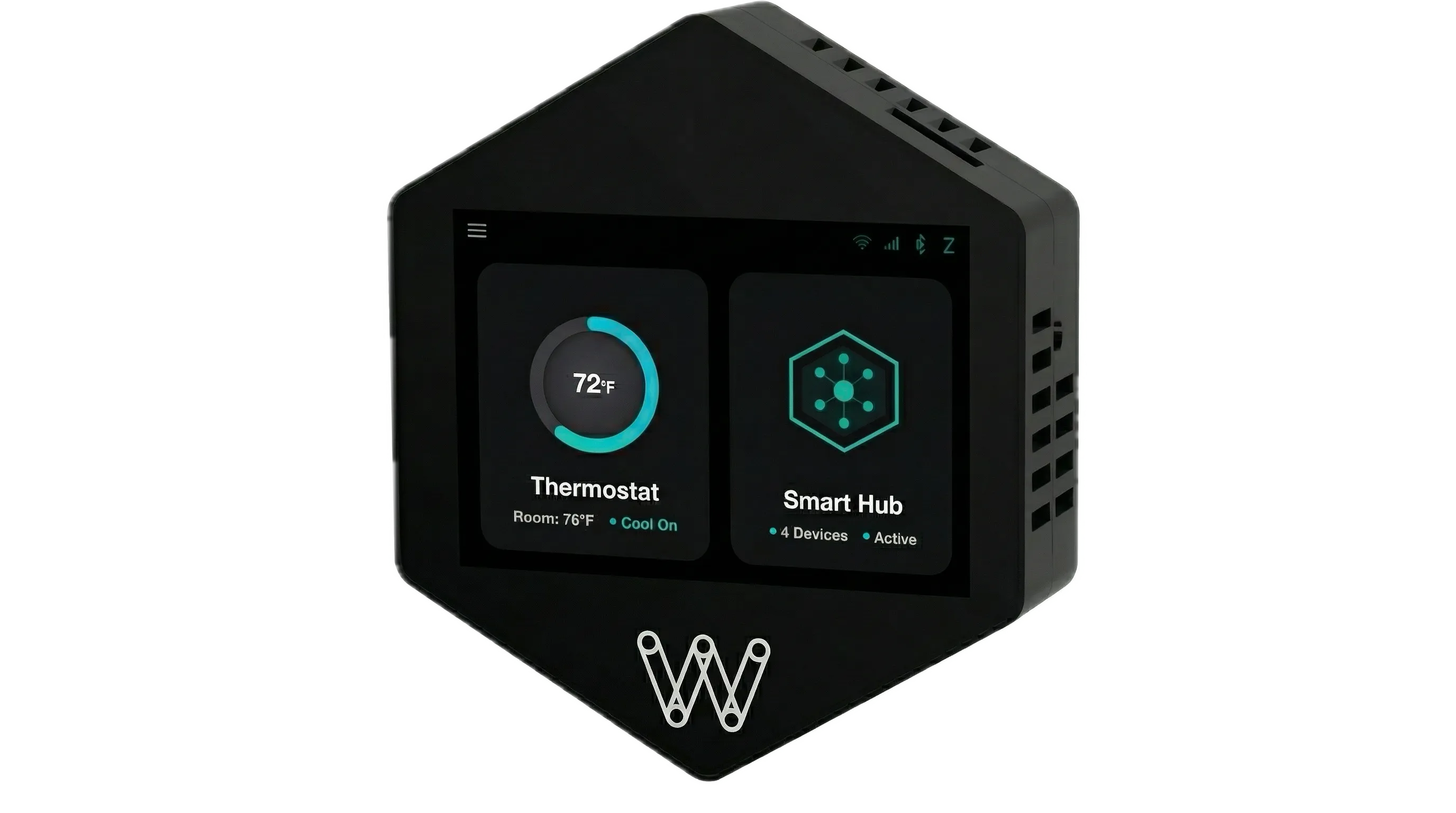
WalTech Vision 2.0 is a direct replacement for Airxcel single-zone and RV Comfort ZC 9-Series multi-zone thermostats. No electrician. No dealer. Just a better thermostat.
Airxcel (formerly Coleman Mach) made a few different models. Look at the pictures below and find yours.
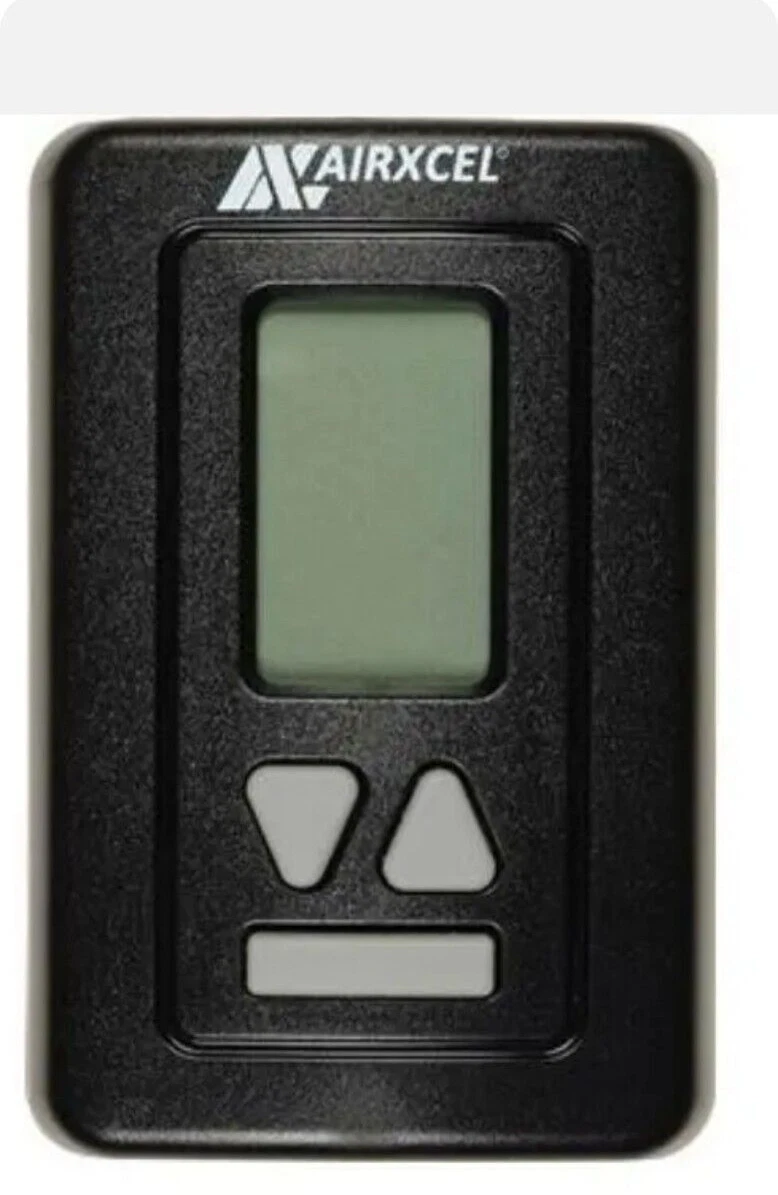
Airxcel Single-Zone Digital
WalTech Compatible
The newer Airxcel digital thermostats. Black vertical units with an LCD display - one has a round jog wheel dial, the other has up/down arrow buttons. Both use simple relay-based wiring where each wire directly controls your AC, heat, or fan.
Installation - about 30 minutes
Turn off the breaker
Remove old Airxcel - photo the wires and their labels on the back
Mount WalTech using the included template and screws
Connect wires: Pin 7 = Power (+12V), Pin 8 = Ground, Pin 6 = Jumper from Pin 7 (relay power)
Connect heating: Pin 5 = Heat 1, Pin 4 = Heat 2 (if you have a second heater)
Connect cooling: Pin 2 = AC compressor
Connect fan: Pin 13 = High fan, Pin 14 = Low fan (if applicable)
Power on, select "Coleman / Airxcel / Home Thermostat," and you're done
Only connect the wires you have. If you only have one heater or no low fan wire, just skip those pins.
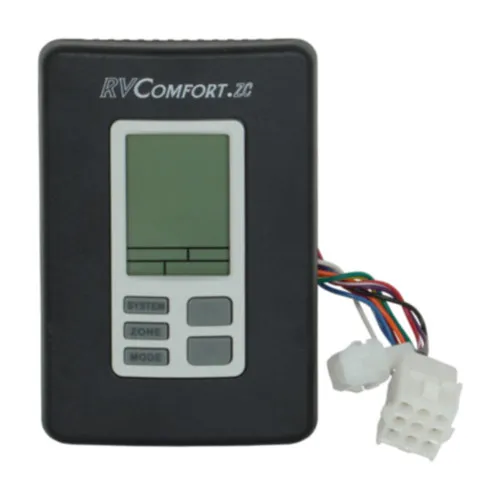
Airxcel RV Comfort ZC 9-Series Multi-Zone
WalTech Compatible
The Airxcel 9-Series multi-zone system (also branded as Coleman Mach RV Comfort ZC). Black vertical unit with System, Zone, and Mode buttons, and a white multi-pin wire connector on the side. Uses relay wiring for heaters plus two RS-485 signal wires for AC and fan communication across zones.
Installation - about 30 minutes
Turn off the breaker
Remove old thermostat - photo the 9-pin and 2-pin connector wires and their labels
Mount WalTech using the included template and screws
Connect power: Pin 7 = +12V IN & OUT, Pin 8 = Ground IN & OUT, Pin 6 = Jumper from Pin 7
Connect heaters to Pins 5, 4, 3, 1 (up to 4 heat zones)
Connect signal wires: Pin A = Purple (RS-485 A), Pin B = Black (RS-485 B)
Power on, select "Coleman 9 Series Multi Zone," and you're done
WalTech auto-detects your zones and starts reading temperatures from each one automatically.
Airxcel Models NOT Compatible with WalTech
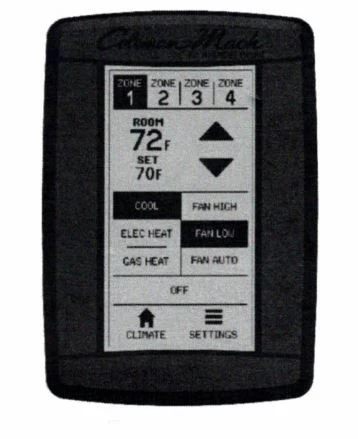
Airxcel / Coleman Mach CAN Bus Multi-Zone
The newer touchscreen multi-zone panel. Full digital interface showing Zone 1/2/3/4 buttons, Climate/Settings at the bottom, and individual controls for Cool, Electric Heat, Gas Heat, and Fan. This uses CAN bus communication - a completely different protocol that WalTech does not support.
Not sure which one you have? Text us a photo at 1-844-WALTECH and we'll tell you in seconds.
Your Airxcel is compatible? Get WalTech Vision 2.0.
Touch screen. Built-in cellular. WalTech AI. About 30 minutes to install.
Yes. WalTech replaces Airxcel single-zone thermostats (both digital and analog) and the RV Comfort ZC 9-Series multi-zone. The only exception is the newer CAN bus multi-zone system.
Is Airxcel the same as Coleman Mach?
Yes. Airxcel acquired Coleman Mach. You'll see both brands on RV thermostats - they use identical wiring and the same WalTech configuration. If your thermostat says Airxcel or Coleman Mach, the installation is the same.
How does Airxcel wiring work?
Airxcel uses simple relay-based wiring. Each wire directly powers a specific component - AC compressor, heater, fan. You match each wire to the correct WalTech pin. WalTech uses a push-and-lock system, so you just push the wire in and it clicks. No crimping or stripping needed.
What is the Pin 7 to Pin 6 jumper for?
Airxcel uses relay-based control, so WalTech needs power sent to the relay system. Pin 7 is your +12V power input, and Pin 6 is the relay common input. A short jumper wire between them feeds power to the relays so WalTech can switch your AC, heat, and fan on and off. A jumper wire is included in the box.
What is the Airxcel RV Comfort ZC 9-Series?
It's Airxcel's multi-zone thermostat for RVs with multiple AC units. It uses relay wiring for heaters plus two RS-485 signal wires (purple and black) for AC and fan communication across zones. WalTech replaces it and auto-detects all connected zones - up to 4.
How do I tell the CAN bus model from the compatible 9-Series?
The compatible 9-Series has a basic LCD, System/Zone/Mode buttons, and a white multi-pin wire connector. The not compatible CAN bus version is a full black touchscreen showing Zone 1/2/3/4 buttons at the top, individual controls for Cool/Electric Heat/Gas Heat/Fan, and Climate/Settings tabs at the bottom. If yours looks like a tablet, it's the CAN bus model.
Do I need an electrician to install WalTech on my Airxcel system?
No. Airxcel wiring is straightforward relay-based - each wire goes to one pin. If you can use a screwdriver, you can do this. And if you get stuck, text us at 1-844-WALTECH and we'll walk you through it.
What is WalTech AI and how does it work?
WalTech AI is our upcoming AI assistant, coming soon. Instead of reading a manual, just tell WalTech AI what you need - "set my bedroom to 68," "what's Zone 2 temperature," or "turn on the fan." It will be like having a smart home assistant built into your thermostat.
What is the WalTech Smart Hub?
WalTech doubles as a smart hub. Connect Mopeka tank sensors, Shelly smart plugs and relays, temperature and humidity sensors, and more. Monitor and control everything from the WalTech touch screen or the mobile app.
Can I monitor my RV remotely after replacing my Airxcel?
Yes. WalTech has built-in cellular (auto-connects to AT&T, T-Mobile, or Verizon) plus dual-band WiFi. Check temperature, change settings, and get pet safety alerts from anywhere using the mobile app. Even without campground WiFi, cellular keeps you connected.
Ready to replace your Airxcel?
Touch screen. Built-in cellular. WalTech AI. Smart Hub. Pet safety. Everything your Airxcel should have been - installed in about 30 minutes.