Start fresh
Tap Settings, then Updates and Reboot, then Erase Everything. Tap Yes, Erase. This clears the old setup. You will join Wi-Fi again later. Already see the Your Air Conditioner screen? Skip to number 3.
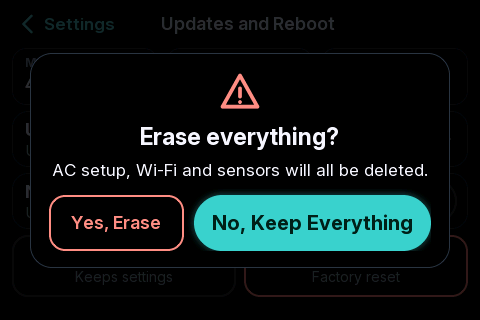
This screen opens
The thermostat restarts and shows this screen by itself.
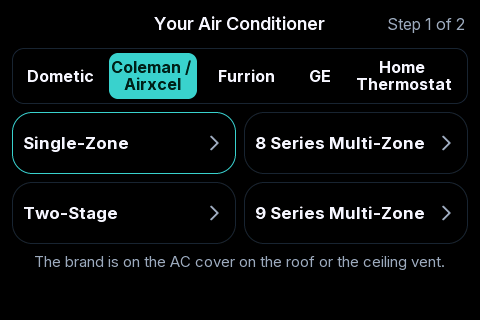
Tap your brand
It is the brand of the thermostat you took off the wall. Tap it here to see what to pick.
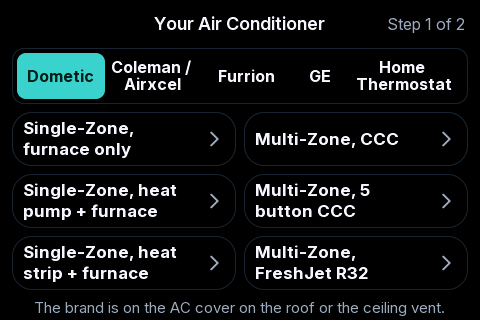
Look behind your old thermostat. Three wires means Single-Zone. A phone-style cable means Multi-Zone.
Tap the one that matches:
- Single-Zone, furnace onlyThe round or square Dometic with 3 wires behind it: power, ground and one signal wire. Pick this one if your only heat is a furnace.
- Multi-Zone, CCCThe wide Comfort Control Center (CCC2) with 10 or 12 buttons, found in many fifth wheels and motorhomes. Runs more than one zone. It plugs in with a phone-style cable.
- Single-Zone, heat pump + furnaceThe same 3-wire Dometic. Pick this one if your AC can also heat (a heat pump) and you have a furnace.
- Multi-Zone, 5 button CCCThe older Comfort Control (Duo-Therm) with five buttons: Mode, Fan, Up, Down and Zone. It plugs in with a phone-style cable.
- Single-Zone, heat strip + furnaceThe same 3-wire Dometic. Pick this one if your AC has an electric heat strip and you have a furnace.
- Multi-Zone, FreshJet R32The newer Dometic FreshJet AC on R32, the kind sold with the Connect Essential thermostat. It plugs in through Dometic's adapter cable.
Single-Zone is the most common RV setup. The 8 and 9 Series are the RV Comfort ZC thermostats that run more than one zone.
Tap the one that matches:
- Single-ZoneThe most common RV thermostat: digital, or the older kind with a slider. One thermostat, one AC. Each wire behind it runs one thing: AC, heat or fan.
- 8 Series Multi-ZoneThe RV Comfort ZC thermostat, model 8330. Runs more than one zone. It has one purple signal wire.
- Two-StageOne zone with two AC units. They can run one at a time or together.
- 9 Series Multi-ZoneThe RV Comfort ZC thermostat with System, Zone and Mode buttons, models 9420 and 9430. Runs more than one zone. It has a purple and a black signal wire.
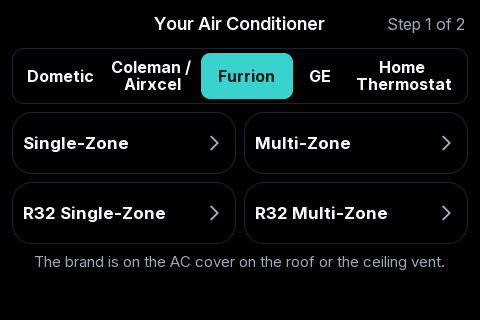
All four use the same 4 wires. Check the part number on the roof unit or the ceiling box: if it ends in 2, pick one of the R32 choices.
Tap the one that matches:
- Single-ZoneThe round black Furrion with a screen and Fan, Mode and power buttons. One AC. There are 4 wires behind it.
- Multi-ZoneThe larger round Furrion with a blue-lit screen and Zone buttons. Runs up to 4 zones.
- R32 Single-ZoneA newer Furrion on R32 with one AC. The part number ends in 2, for example FACR15HESA2.
- R32 Multi-ZoneA newer Furrion on R32 with more than one zone. The part number ends in 2, for example FACW12ESZA2.
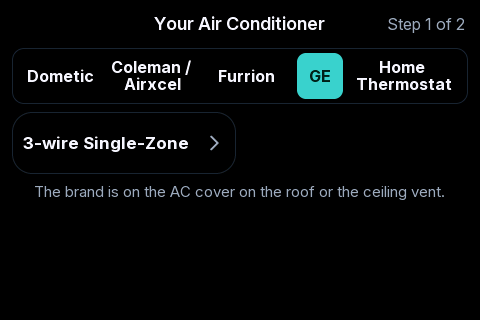
Check the model number on the back of your old GE thermostat before you start.
Tap the one that matches:
- 3-wire Single-ZoneThe standard GE or GE Profile, white or black, with 3 wires behind it. The model number must start with RAR, for example RARWT2B. Models starting with RGR or RPR are R32 and are not supported.
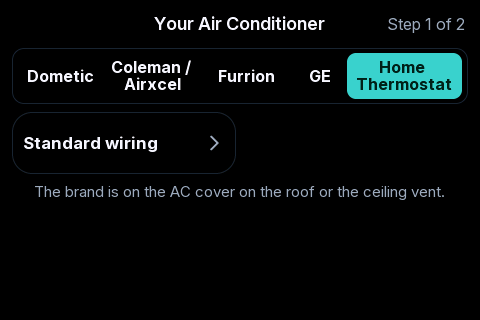
For 24 volt home and commercial systems.
Tap the one that matches:
- Standard wiringA regular 24 volt home thermostat with lettered wires such as R, C, W, Y and G. Works with heat pumps and furnaces.
Tell it your heaters
There are 3 lines. Tap a line to change it. Keep tapping until it shows the right one. Fill in all 3 lines.
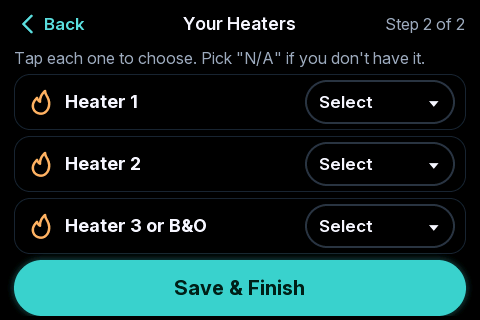
- N/AYou do not have one. Use this for any empty line.
- Heat PumpYour AC can also heat.
- FurnaceYour propane heater.
- Heat StripA small electric heater inside the AC.
What to pick for your system:
- Dometic 5-buttonAlways pick Heater 1: Heat Pump, Heater 2: Heat Strip, Heater 3: Furnace. Pick these even if you do not have all three. Nothing else works on this system.
- Other Dometic, GE and FurrionHeater 1: Heat Pump or Heat Strip, if you have one. Heater 2: Furnace. Furnace only? Make it Heater 1 and pick N/A for the rest.
- Coleman single zonePick them in the order you wired them: Heater 1 is the wire in 5, Heater 2 is the wire in 4, Heater 3 is the wire in 3.
- Coleman two-stageHeater 1 and Heater 2 can be anything. Heater 3 can be Heat Pump or Heat Strip, not Furnace.
- Coleman 8 or 9 SeriesEach zone can have up to 2 heats. Heater 1: Heat Pump or Heat Strip, if you have one. Heater 2: Furnace. Heater 3: always N/A.
- Home ThermostatHeater 1 is the W wire. Heater 2 is the W2 wire. Pick B&O for Heater 3 if you wired an O or B wire.
Tap Save & Finish
It says All set. Tap OK. You are on the Home screen.
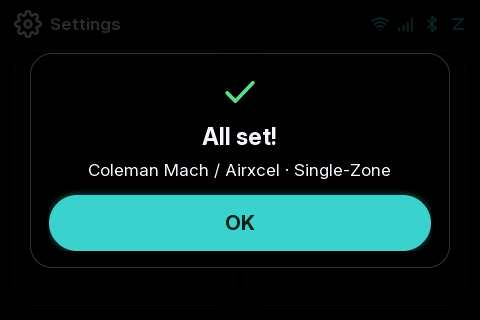
Picked the wrong one? Do this step again from the top.
Step 3 of 5 is done. You are not finished yet: 2 more steps to go.
Go to step 4: The thermostat →Questions
How do I set up my WalTech UST 3.0 the first time?
Turn the power on, tap your AC brand, tap the choice that matches your old thermostat, fill in your three heater lines, then tap Save & Finish.
Stuck? Text a photo of your screen to 1-844-WALTECH. Text only, no calls.